Xillix business software · Featuring LuxonLink

Give employees answers. See what’s missing.

With LuxonLink, employees get answers from your company documents and can open the cited page to check them. Managers see which questions those documents leave unanswered, so they know what to clarify before the next shift.

5 hours a week if 25 employees each save 4 minutes on 3 lookups. Use your numbers →

LLuxonLinkLIVE SANDBOX

Ask a question. Check the source.

Try the operations playbook or bring a public document. You can ask three questions.

Choose or drop a text PDF · up to 5 MB and 50 pages

Your file stays in this browser. When you ask, Xillix and OpenAI process your question and selected passages. Use public material.

Cited source page

Open original PDF in a new tab ↗

LuxonLink for managers & document owners

Find the questions your company documents can’t answer.

“Who can approve an emergency repair after hours?”

The day-shift procedure names an approver. The night crew needs another answer. LuxonLink can flag a question the available documents don’t settle. An operations manager can check whether the rule is missing, unclear, or simply outside this library.

See the reports a manager can use →
LuxonLink / ReportsAdmin view
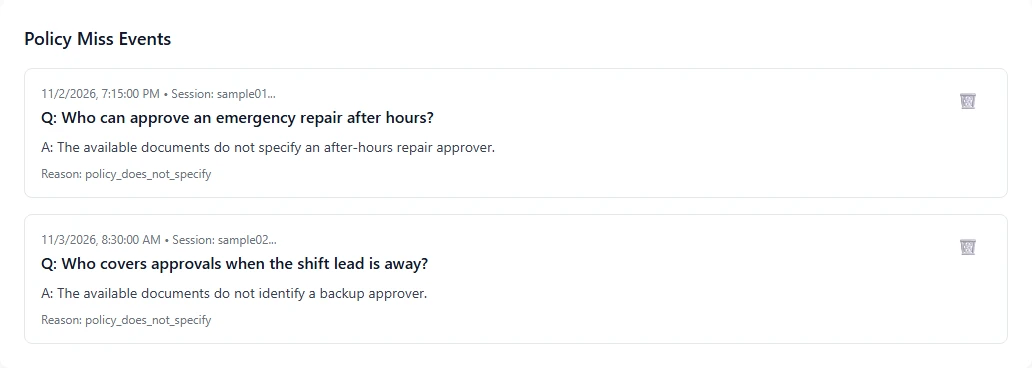
Policy Miss Events lists the after-hours repair and backup approver questions, their replies, and why they were flagged.
Actual LuxonLink screen with two fictional questions. A flagged question is a lead for review, not proof that a policy does not exist.

Our products

Who needs an answer?

Employee knowledge

LuxonLink

Make the expertise in your documents available on every shift.

Give support reps, new hires, and department leads one place to ask about policy or procedure. Employees can check the cited page; managers can review unanswered questions and feedback.

Explore LuxonLink

Website sales

LuxonLeadAssist

Give sales a conversation to follow up on.

Answer buyers’ questions from your product information. When a visitor requests contact, the rep can see what they asked and where the conversation started.

Explore LuxonLeadAssist

Compare the two products → How pricing works →

Check the product evidence

See what reaches the manager.

Watch a supervisor ask about an overnight repair. Check the written approval on page four. Then see how LuxonLink records a second question the guide leaves unanswered.

Recorded in LuxonLink using fictional workplace documents.

Time saved · estimate

What is one faster answer worth across a shift?

Time a lookup today, then time the same question in LuxonLink, including the source check. Use the difference below.

Include labor cost and calculate break-even →
5 hours per weekEstimated time recovered using your inputs. Actual time savings depend on the work.

LuxonLink pricing · USD

$325 per month for your first department

5 GB of document storage included per department

Each department gets its own separate LuxonLink instance. The service fee covers software updates and technical support to keep that instance running.

AI usage is separate. You supply your own OpenAI API key and pay OpenAI directly for the AI your team uses.

First department · monthly billing

$5,400 in year one

Pay $1,500 once for setup, then $325 each month. Includes 5 GB of document storage.

Request monthly service →

First department · annual billing

$4,620 in year one

Pay $1,500 for setup and $3,120 per year for your first department for service, with 5 GB included. That’s $260 per month, saving $780 per year — 20% on base service.

Request annual service →

Each additional department

$195 per month

Plus $750 one-time setup for a standard rollout. Each department gets its own separate instance and 5 GB of document storage.

Three departments: $715 per month in base service with monthly billing.

Request a multi-department quote →

Flexible setup payments. Split the first department’s setup into two $750 payments: one at configuration and one at launch.

Need more document storage? $15 per additional 5 GB block per month for the instance that needs it.

First-year totals include setup and base service paid to Xillix. Optional storage and OpenAI usage are separate. LuxonLeadAssist is priced separately.

Talk to Xillix

Bring the question your team keeps asking.

See the answer an employee gets and the report a manager uses to improve the guide.